Business
FASTag Statement Download: 3 Easy Ways to Check Your Toll Transactions and Download the Statement
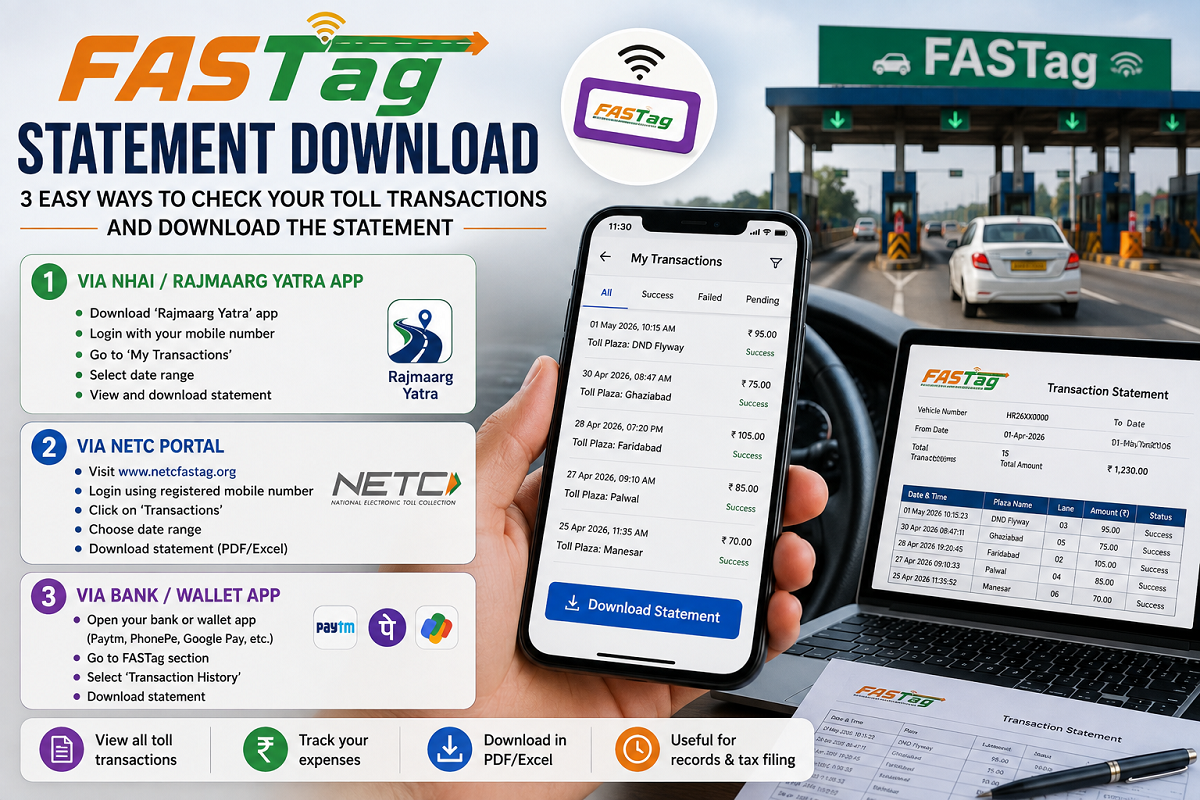
FASTag Statement Download: Wondering where your FASTag balance was deducted or want to verify a toll charge? You don't have to visit a bank or customer service center. FASTag users can easily view and download their transaction history using their smartphone through multiple online methods.
Whether your FASTag was issued by a bank, the Indian Highways Management Company Limited (IHMCL), or a payment app, you can access your statement within minutes. Here's a step-by-step guide to downloading your FASTag statement and checking your toll payment history.
Why Should You Check Your FASTag Statement?
Downloading your FASTag statement can help you:
- Verify toll deductions.
- Track where and when your FASTag was used.
- Identify incorrect or duplicate transactions.
- Monitor your available FASTag balance.
- Keep a record of toll payments for reimbursement or expense tracking.
If you notice an unexpected deduction after recharging your FASTag, reviewing the transaction history is the quickest way to understand what happened.
Method 1: Download FASTag Statement from the Official IHMCL Portal
If your FASTag is linked to the IHMCL portal, you can download your statement directly online.
Steps to Download
- Open your web browser on your smartphone or computer.
- Visit the official FASTag portal.
- Select the FASTag Login option.
- Sign in using your registered mobile number and verify with the OTP.
- After logging in, open the dashboard.
- Click Statement or Toll Transaction Details.
- Select the desired date range.
- Choose Download PDF.
- Save the statement to your device.
The downloaded PDF will contain your complete toll transaction history for the selected period.
Method 2: Download FASTag Statement Using Your Bank's Mobile App
If your FASTag was issued by your bank, you can also access your transaction history through the bank's mobile banking application.
Steps
- Open your bank's official mobile banking app.
- Log in securely.
- Navigate to the FASTag section.
- Select Transaction History or Download Statement.
- Choose the required date range.
- Download the PDF statement to your phone.
Many banking apps also allow users to view individual toll transactions without downloading the complete statement.
Method 3: Download FASTag Statement Through a Payment App
Users who purchased FASTag through payment platforms can also check their transaction history directly from the respective app.
Supported payment apps may include digital payment platforms that offer FASTag services.
Steps
- Open the payment app where your FASTag is registered.
- Go to the FASTag section.
- Tap Transaction History.
- Select the required time period.
- Choose the Download PDF option, if available.
- Save the statement on your device.
You can also review individual recharge and toll deduction records within the app.
What Information Does a FASTag Statement Include?
A typical FASTag statement contains:
- Date and time of each toll transaction
- Toll plaza name
- Amount deducted
- FASTag account balance
- Recharge history
- Refunds, if any
- Transaction reference numbers
These details help users verify whether all deductions are accurate.
What to Do If You Notice an Incorrect Toll Deduction?
If you find a transaction that appears incorrect:
- Compare the toll plaza location with your travel history.
- Verify the transaction date and time.
- Contact your FASTag issuer's customer support.
- Raise a dispute through your bank, IHMCL portal, or payment app if necessary.
- Keep your downloaded statement as supporting evidence while filing a complaint.
Tips for Managing Your FASTag Account
To avoid issues related to toll payments:
- Keep sufficient balance in your FASTag account.
- Regularly review your transaction history.
- Enable SMS and app notifications for every deduction.
- Update your registered mobile number if required.
- Download statements periodically for your records.
Final Take
Checking your FASTag transaction history has become quick and convenient thanks to digital services offered by IHMCL, banks, and payment apps. Whether you want to confirm where your toll balance was deducted or simply maintain payment records, downloading your FASTag statement takes only a few minutes.
Regularly reviewing your statement can help you identify incorrect deductions early and ensure that your FASTag account remains accurate and up to date.